Developer Guide
- Table of Contents
- Acknowledgements
- Setting up, getting started
- Design
- Implementation
- Documentation, logging, testing, configuration, dev-ops
- Appendix: Requirements
-
Appendix: Instructions for manual testing
- 1. Launch, shutdown & window preferences
- 2. Quick seed data (contacts)
- 3. add, edit, find, tag, sort (contacts)
- 4. delete (contacts)
- 5. Create projects with padd
- 6. View projects: pshow & pdetails
- 7. Join & Leave projects: join, leave (+ safety)
- 8. Edit projects: pedit
- 9. Delete projects: pdelete
- 10. Deadlines view: deadline
- 11. Data saving & file edits
- 12. Help & known-issues checks
- 13. Clear & Exit
- Suggested end-to-end path (copy-paste block)
- Notes on edge cases for exploratory testing
- Appendix: Planned Enhancements
Acknowledgements
- Libraries used: Checkstyle, Jackson, JavaFX, JUnit, Shadow
- References used: SE-EDU initiative, AB3
Setting up, getting started
Refer to the guide Setting up and getting started.
Design
 Tip: The
 .puml files used to create diagrams are in this document docs/diagrams folder. Refer to the PlantUML Tutorial at se-edu/guides to learn how to create and edit diagrams.
Architecture
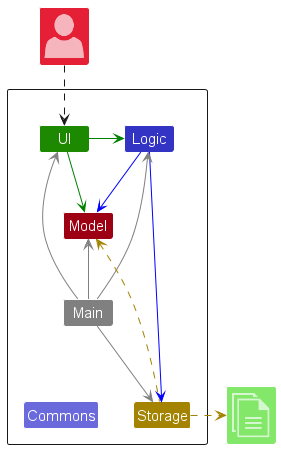
The Architecture Diagram given above explains the high-level design of the App.
Given below is a quick overview of main components and how they interact with each other.
Main components of the architecture
Main (consisting of classes Main and MainApp) is in charge of the app launch and shut down.
- At app launch, it initializes the other components in the correct sequence, and connects them up with each other.
- At shut down, it shuts down the other components and invokes cleanup methods where necessary.
The bulk of the app’s work is done by the following four components:
-
UI: The UI of the App. -
Logic: The command executor. -
Model: Holds the data of the App in memory. -
Storage: Reads data from, and writes data to, the hard disk.
Commons represents a collection of classes used by multiple other components.
How the architecture components interact with each other
The Sequence Diagram below shows how the components interact with each other for the scenario where the user issues the command delete 1.
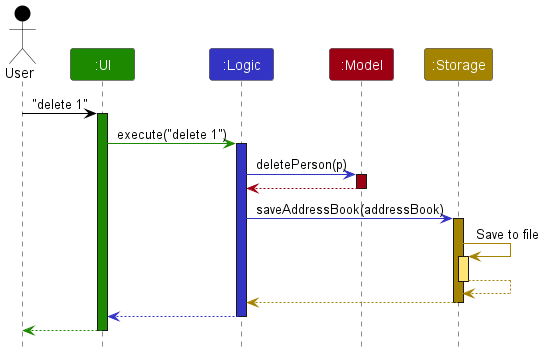
Each of the four main components (also shown in the diagram above),
- defines its API in an
interfacewith the same name as the Component. - implements its functionality using a concrete
{Component Name}Managerclass (which follows the corresponding APIinterfacementioned in the previous point.
For example, the Logic component defines its API in the Logic.java interface and implements its functionality using the LogicManager.java class which follows the Logic interface. Other components interact with a given component through its interface rather than the concrete class (reason: to prevent outside component’s being coupled to the implementation of a component), as illustrated in the (partial) class diagram below.
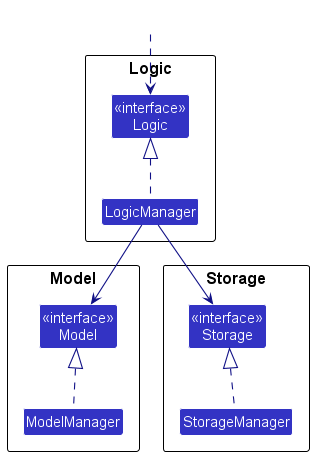
The sections below give more details of each component.
UI component
The API of this component is specified in Ui.java
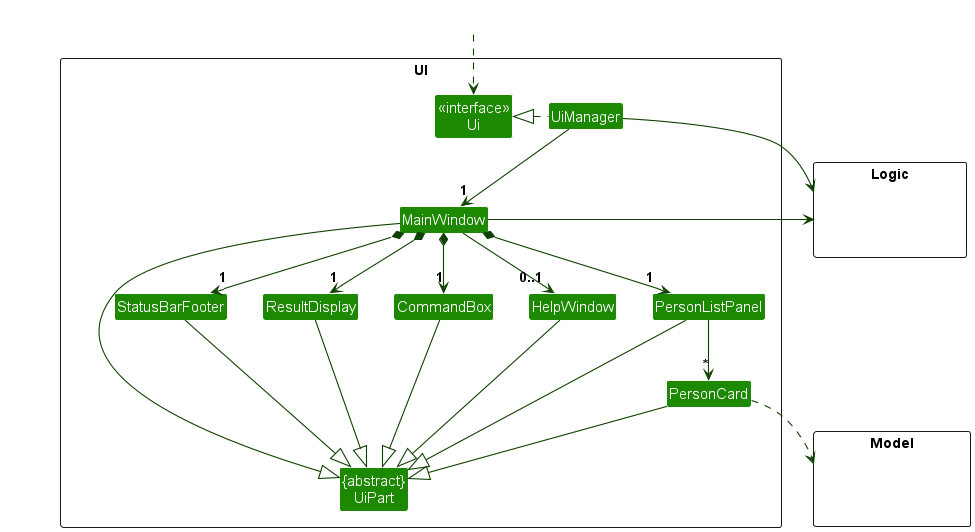
The UI consists of a MainWindow that is made up of parts e.g.CommandBox, ResultDisplay, PersonListPanel, StatusBarFooter etc. All these, including the MainWindow, inherit from the abstract UiPart class which captures the commonalities between classes that represent parts of the visible GUI.
The UI component uses the JavaFx UI framework. The layout of these UI parts are defined in matching .fxml files that are in the src/main/resources/view folder. For example, the layout of the MainWindow is specified in MainWindow.fxml.
The UI component,
- executes user commands using the
Logiccomponent. - listens for changes to
Modeldata so that the UI can be updated with the modified data. - keeps a reference to the
Logiccomponent, because theUIrelies on theLogicto execute commands. - depends on some classes in the
Modelcomponent, as it displaysPersonobject residing in theModel.
Logic component
API : Logic.java
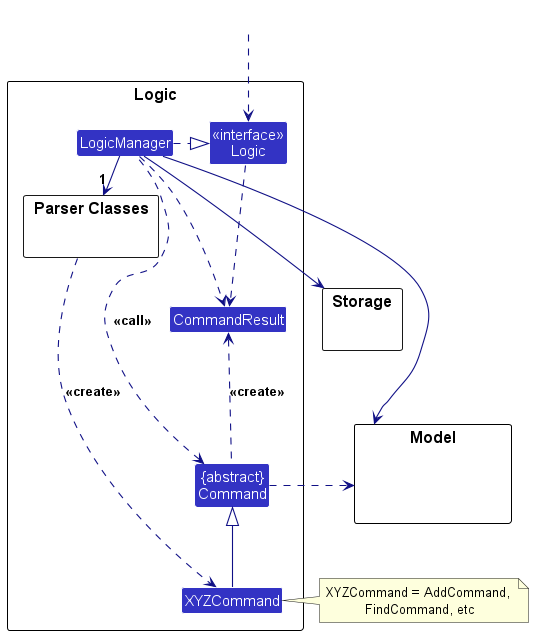
Here’s a (partial) class diagram of the Logic component:
The sequence diagram below illustrates the interactions within the Logic component, taking execute("delete 1") API call as an example.
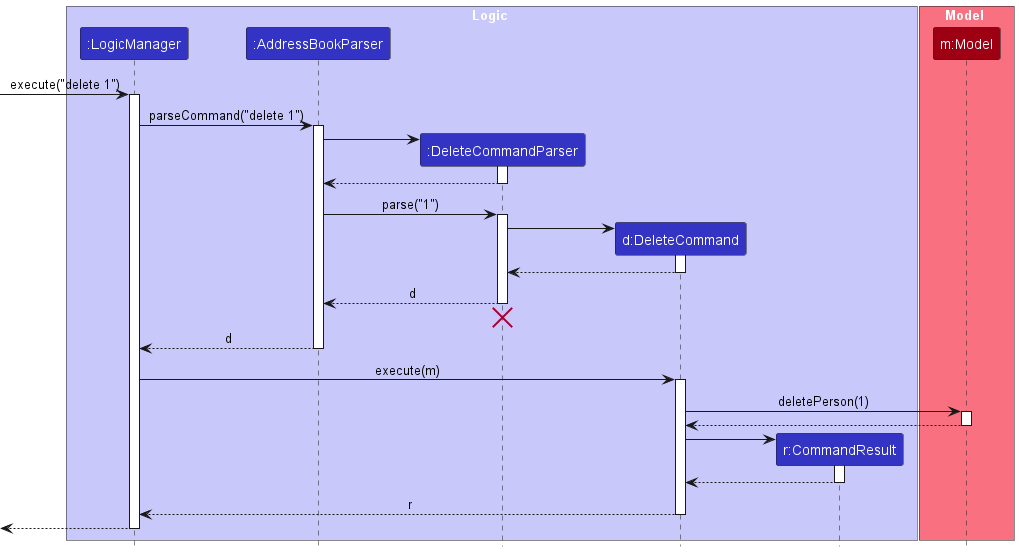
 Note: The lifeline for
 DeleteCommandParser should end at the destroy marker (X) but due to a limitation of PlantUML, the lifeline continues till the end of diagram.
How the Logic component works:
- When
Logicis called upon to execute a command, it is passed to anAddressBookParserobject which in turn creates a parser that matches the command (e.g.,DeleteCommandParser) and uses it to parse the command. - This results in a
Commandobject (more precisely, an object of one of its subclasses e.g.,DeleteCommand) which is executed by theLogicManager. - The command can communicate with the
Modelwhen it is executed (e.g. to delete a person).
Note that although this is shown as a single step in the diagram above (for simplicity), in the code it can take several interactions (between the command object and theModel) to achieve. - The result of the command execution is encapsulated as a
CommandResultobject which is returned back fromLogic.
Here are the other classes in Logic (omitted from the class diagram above) that are used for parsing a user command:
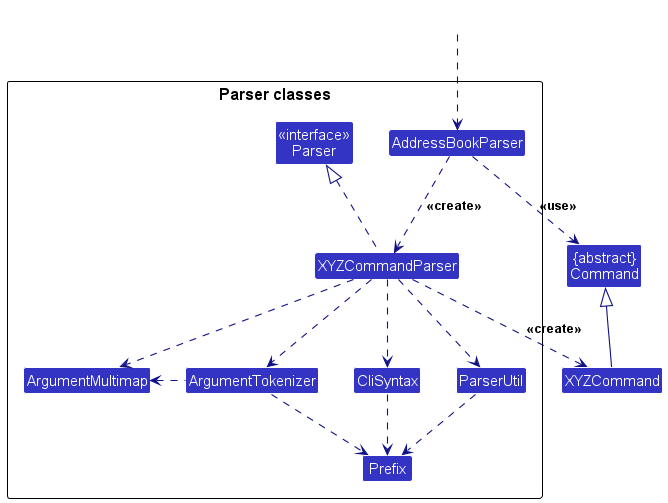
How the parsing works:
- When called upon to parse a user command, the
AddressBookParserclass creates anXYZCommandParser(XYZis a placeholder for the specific command name e.g.,AddCommandParser) which uses the other classes shown above to parse the user command and create aXYZCommandobject (e.g.,AddCommand) which theAddressBookParserreturns back as aCommandobject. - All
XYZCommandParserclasses (e.g.,AddCommandParser,DeleteCommandParser, …) inherit from theParserinterface so that they can be treated similarly where possible e.g, during testing.
Model component
API : Model.java
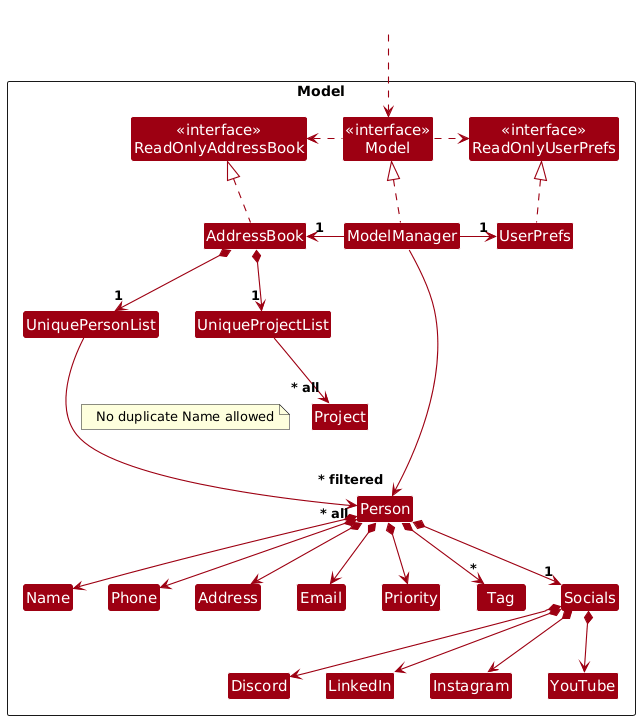
The Model component,
- stores the address book data i.e., all
Personobjects (which are contained in aUniquePersonListobject). - stores the currently ‘selected’
Personobjects (e.g., results of a search query) as a separate filtered list which is exposed to outsiders as an unmodifiableObservableList<Person>that can be ‘observed’ e.g. the UI can be bound to this list so that the UI automatically updates when the data in the list change. - stores a
UserPrefobject that represents the user’s preferences. This is exposed to the outside as aReadOnlyUserPrefobjects. - does not depend on any of the other three components (as the
Modelrepresents data entities of the domain, they should make sense on their own without depending on other components)
Note: An alternative (arguably, a more OOP) model is given below. It has a Tag list in the AddressBook, which Person references. This allows AddressBook to only require one Tag object per unique tag, instead of each Person needing their own Tag objects.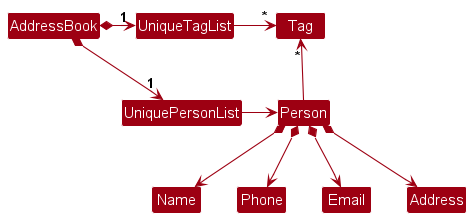
Storage component
API : Storage.java
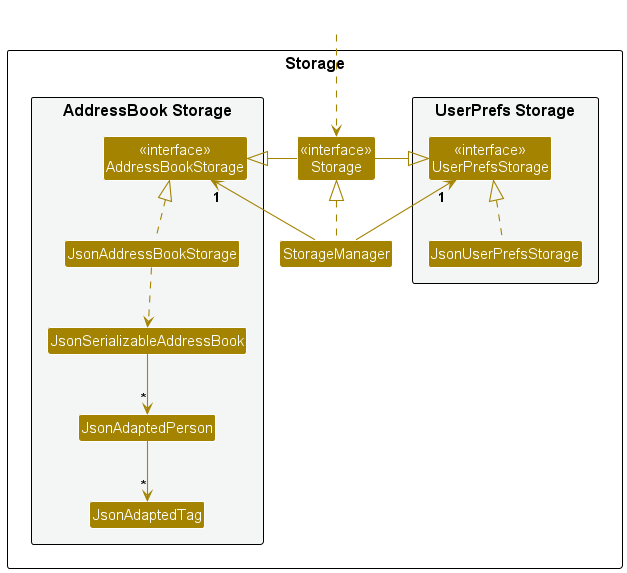
The Storage component,
- can save both address book data and user preference data in JSON format, and read them back into corresponding objects.
- inherits from both
AddressBookStorageandUserPrefStorage, which means it can be treated as either one (if only the functionality of only one is needed). - depends on some classes in the
Modelcomponent (because theStoragecomponent’s job is to save/retrieve objects that belong to theModel)
Common classes
Classes used by multiple components are in the seedu.address.commons package.
Implementation
This section describes some noteworthy details on how certain features are implemented.
Project Management Features
The project management features allow users to create, delete, and display projects within the application. These features are implemented through three main commands (a fourth command pdetails (project details) is similarly implemented to pshow): padd (add project), pdelete (delete project), and pshow (show project).
Add Project Feature
Implementation
The add project mechanism is facilitated by AddProjectCommand and AddProjectCommandParser. The command allows users to create a new project with a name, deadline, priority, and member indices.
The following sequence diagram shows how the add project operation works:
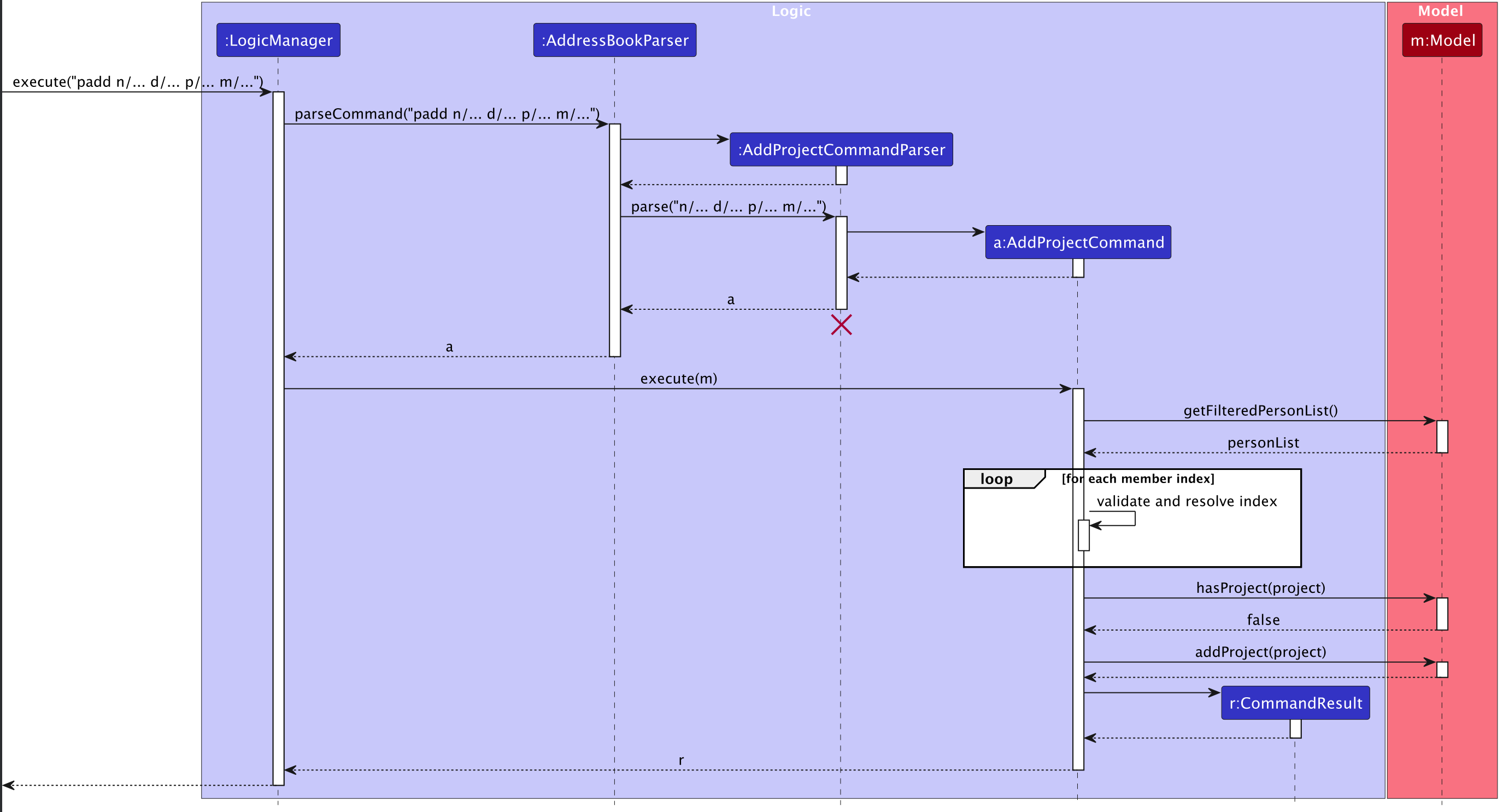
How the Add Project feature works:
- When the user executes the
paddcommand (e.g.padd n/Website Redesign d/Revamp company website p/web t/urgent m/1 m/2), theLogicManagerreceives the command string. - The
AddressBookParsercreates anAddProjectCommandParserto parse the command arguments. - The parser validates the command format and extracts the project name, description, project tags, and member indices.
- For each member index provided, the command validates that the index exists in the filtered person list.
- An
AddProjectCommandobject is created with the parsed project details. - When executed, the command checks if a project with the same name already exists using
Model#hasProject(). - If the project is unique, it is added to the model using
Model#addProject(). - A
CommandResultis returned with a success message.
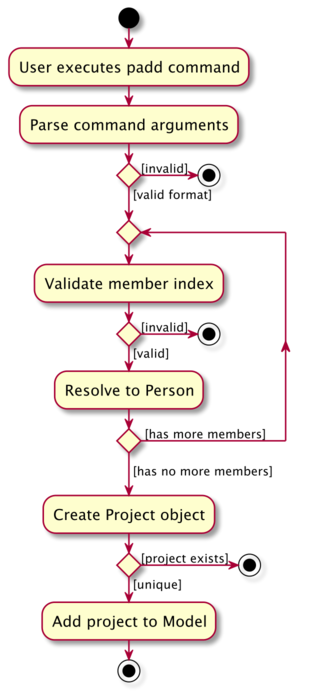
The following activity diagram summarizes what happens when a user executes the padd command:
Delete Project Feature
Implementation
The delete project mechanism is facilitated by DeleteProjectCommand and DeleteProjectCommandParser. The command allows users to delete an existing project by its exact name.
The following sequence diagram shows how the delete project operation works:
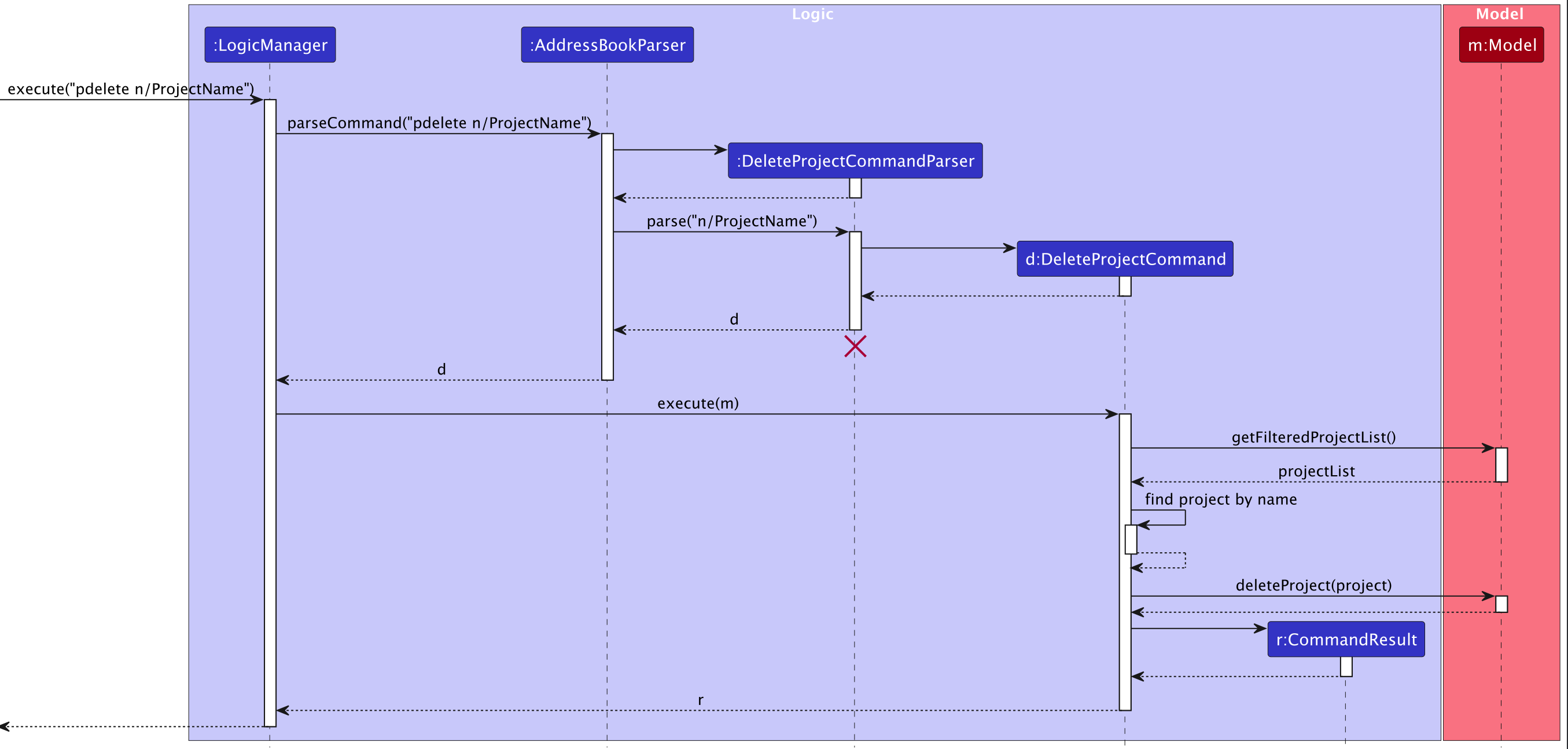
Note: The lifeline for DeleteProjectCommandParser should end at the destroy marker (X) but due to a limitation of PlantUML, the lifeline continues till the end of diagram.
How the Delete Project feature works:
- When the user executes the
pdeletecommand (e.g.pdelete n/Website Redesign), theLogicManagerreceives the command string. - The
AddressBookParsercreates aDeleteProjectCommandParserto parse the command arguments. - The parser extracts the project name from the command.
- A
DeleteProjectCommandobject is created with the parsed project name. - When executed, the command retrieves the filtered project list using
Model#getFilteredProjectList(). - The command searches for a project with the matching name in the list.
- If found, the project is deleted from the model using
Model#deleteProject(). - A
CommandResultis returned with a success message.
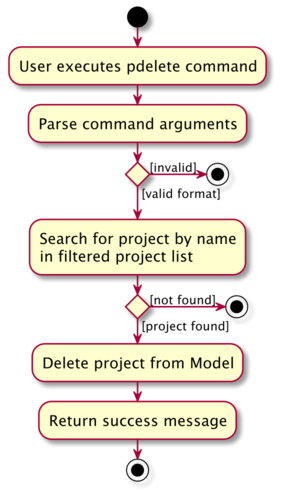
The following activity diagram summarizes what happens when a user executes the pdelete command:
Show Project Feature
Implementation
The show project mechanism is facilitated by ShowProjectCommand and ShowProjectCommandParser. The command allows users to display information about a specific person’s projects by their index.
The following sequence diagram shows how the show project operation works:
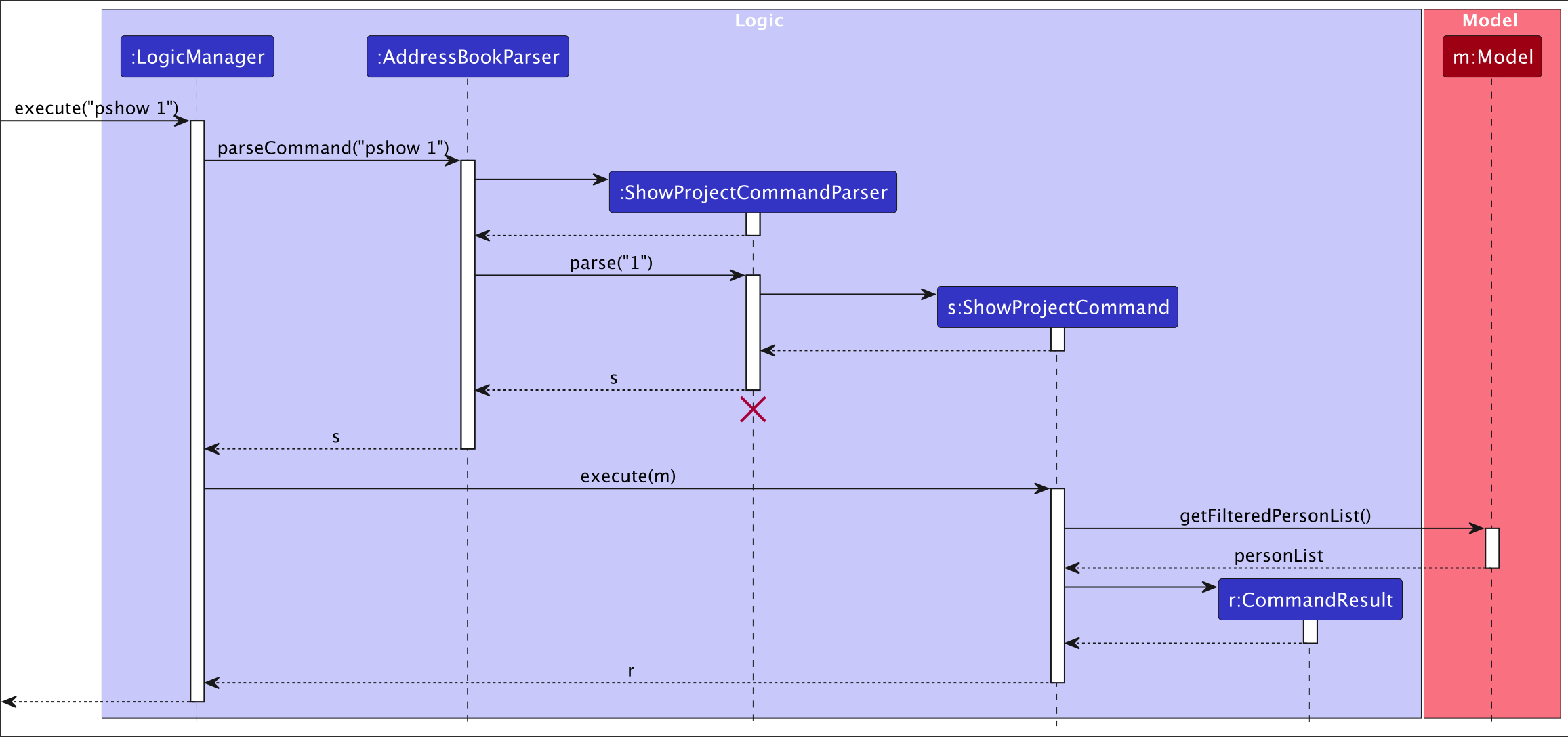
How the Show Project feature works:
- When the user executes the
pshowcommand (e.g.pshow 1), theLogicManagerreceives the command string. - The
AddressBookParsercreates aShowProjectCommandParserto parse the command arguments. - The parser validates and extracts the person index from the command.
- A
ShowProjectCommandobject is created with the parsed index. - When executed, the command retrieves the filtered person list using
Model#getFilteredPersonList(). - The command validates that the index is within the bounds of the person list.
- A
CommandResultis returned with the target person index, allowing the UI to display the person’s project details.
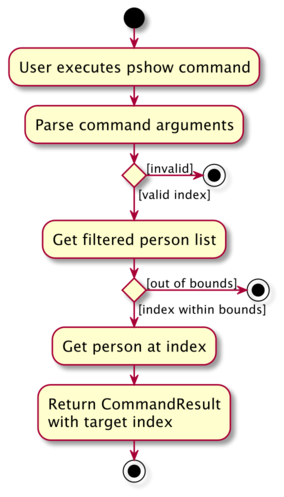
The following activity diagram summarizes what happens when a user executes the pshow command:
[Proposed] Undo/redo feature
Proposed Implementation
The proposed undo/redo mechanism is facilitated by VersionedAddressBook. It extends AddressBook with an undo/redo history, stored internally as an addressBookStateList and currentStatePointer. Additionally, it implements the following operations:
-
VersionedAddressBook#commit()— Saves the current address book state in its history. -
VersionedAddressBook#undo()— Restores the previous address book state from its history. -
VersionedAddressBook#redo()— Restores a previously undone address book state from its history.
These operations are exposed in the Model interface as Model#commitAddressBook(), Model#undoAddressBook() and Model#redoAddressBook() respectively.
Given below is an example usage scenario and how the undo/redo mechanism behaves at each step.
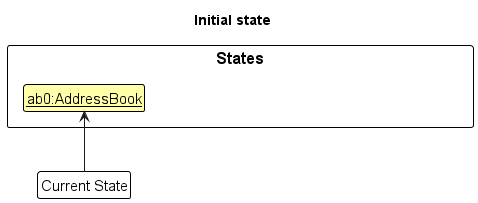
Step 1. The user launches the application for the first time. The VersionedAddressBook will be initialized with the initial address book state, and the currentStatePointer pointing to that single address book state.
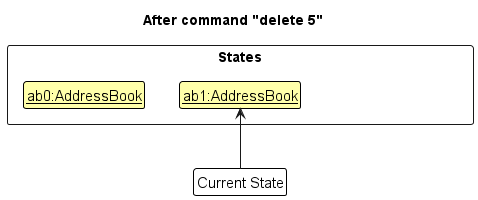
Step 2. The user executes delete 5 command to delete the 5th person in the address book. The delete command calls Model#commitAddressBook(), causing the modified state of the address book after the delete 5 command executes to be saved in the addressBookStateList, and the currentStatePointer is shifted to the newly inserted address book state.
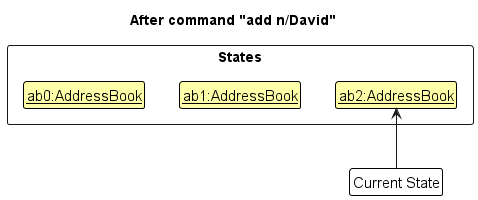
Step 3. The user executes add n/David … to add a new person. The add command also calls Model#commitAddressBook(), causing another modified address book state to be saved into the addressBookStateList.
Note: If a command fails its execution, it will not call Model#commitAddressBook(), so the address book state will not be saved into the addressBookStateList.
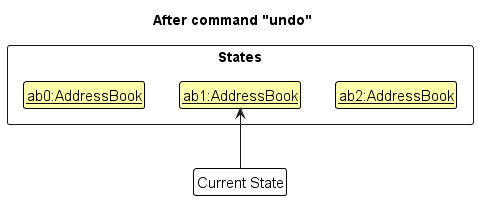
Step 4. The user now decides that adding the person was a mistake, and decides to undo that action by executing the undo command. The undo command will call Model#undoAddressBook(), which will shift the currentStatePointer once to the left, pointing it to the previous address book state, and restores the address book to that state.
Note: If the currentStatePointer is at index 0, pointing to the initial AddressBook state, then there are no previous AddressBook states to restore. The undo command uses Model#canUndoAddressBook() to check if this is the case. If so, it will return an error to the user rather
than attempting to perform the undo.
The following sequence diagram shows how an undo operation goes through the Logic component:
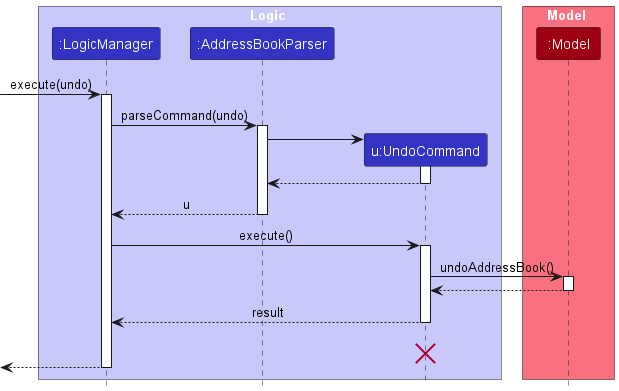
Note: The lifeline for UndoCommand should end at the destroy marker (X) but due to a limitation of PlantUML, the lifeline reaches the end of diagram.
Similarly, how an undo operation goes through the Model component is shown below:
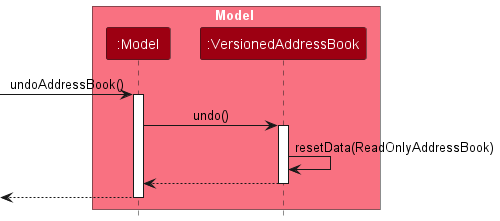
The redo command does the opposite — it calls Model#redoAddressBook(), which shifts the currentStatePointer once to the right, pointing to the previously undone state, and restores the address book to that state.
Note: If the currentStatePointer is at index addressBookStateList.size() - 1, pointing to the latest address book state, then there are no undone AddressBook states to restore. The redo command uses Model#canRedoAddressBook() to check if this is the case. If so, it will return an error to the user rather than attempting to perform the redo.
Step 5. The user then decides to execute the command list. Commands that do not modify the address book, such as list, will usually not call Model#commitAddressBook(), Model#undoAddressBook() or Model#redoAddressBook(). Thus, the addressBookStateList remains unchanged.
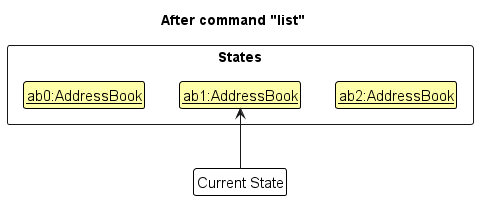
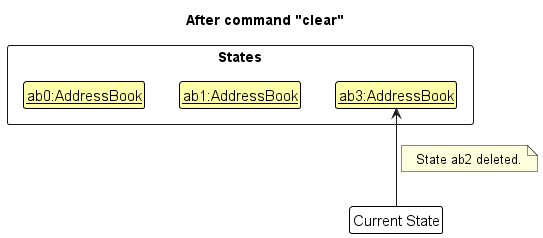
Step 6. The user executes clear, which calls Model#commitAddressBook(). Since the currentStatePointer is not pointing at the end of the addressBookStateList, all address book states after the currentStatePointer will be purged. Reason: It no longer makes sense to redo the add n/David … command. This is the behavior that most modern desktop applications follow.
The following activity diagram summarizes what happens when a user executes a new command:
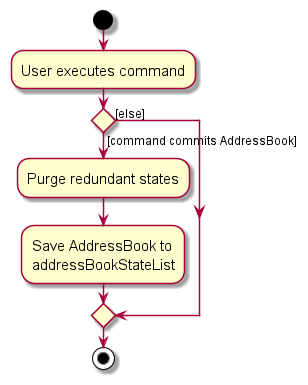
Design considerations:
Aspect: How undo & redo executes:
-
Alternative 1 (current choice): Saves the entire address book.
- Pros: Easy to implement.
- Cons: May have performance issues in terms of memory usage.
-
Alternative 2: Individual command knows how to undo/redo by
itself.
- Pros: Will use less memory (e.g. for
delete, just save the person being deleted). - Cons: We must ensure that the implementation of each individual command are correct.
- Pros: Will use less memory (e.g. for
Documentation, logging, testing, configuration, dev-ops
Appendix: Requirements
Product scope
Target user profile:
- Manages a large number of contacts and collaborators.
- Prefers desktop apps and keyboard-driven interactions over mouse use.
- Fast typist and comfortable with CLI or command-based apps.
- Needs quick access to contact info and project associations.
- Values efficiency, organization, and minimal disruption to creative flow.
Value proposition: Targeted at tech content creators who manage their projects and clients independently. It will allow them to manage their projects and clients easily within the app by providing quick access to contact details and their information.
User stories
Priorities: High (must have) - * * *, Medium (nice to have) - * *, Low (unlikely to have) - *
| Priority | As a… | I want to… | So that I can… |
|---|---|---|---|
| *** | content creator working alone | quickly add new contacts | save project and collaborators’ details without interrupting my creative flow |
| *** | content creator | add multiple tags to multiple contacts in one command | quickly organise my network logically and avoid mixing up roles |
| *** | content creator | store all of a collaborator’s info in one profile | access their phone, email, discord and other social media handles in one app |
| *** | content creator | quickly delete outdated and unused contacts | keep my contact list relevant |
| *** | content creator | search contacts by fields such as name or organisations | immediately find collaborators when planning a project or sending an email |
| *** | content creator | update a contact’s details | keep information accurate |
| *** | content creator | associate contacts with specific projects and videos | see who is involved in which project at a glance |
| *** | content creator | see what projects have upcoming deadlines | finish them on time and be reminded to contact the associated persons |
| ** | content creator | bookmark certain contacts as high priority | know which contacts to pay more attention to |
| * | content creator | sort contacts based on various fields | skim through all of them in differing orders |
Use cases
Use case: Delete a person
MSS
- User requests to list persons
- IndiDex shows a list of persons
- User requests to delete a specific person in the list
-
IndiDex deletes the person
Use case ends.
Extensions
-
2a. The list is empty.
Use case ends.
-
3a. The given index is invalid.
-
3a1. IndiDex shows an error message.
Use case ends.
-
Use Case: Add a tag to a person
MSS
- User requests to list persons
- IndiDex shows a list of persons
- User requests to add a specific person’s tags from the list of persons
-
IndiDex adds tags to the person
Use case ends.
Extensions
-
2a. The list is empty.
Use case ends.
-
3a. The given index is invalid.
-
3a1. IndiDex shows an error message.
Use case ends.
-
-
3b. The given tag is invalid.
-
3b1. IndiDex shows an error message.
Use case ends.
-
Use Case: Add a person
MSS
- User requests to add a new person with their details.
-
IndiDex adds the person with their details.
Use case ends.
Extensions
- 1a. The person’s details are invalid.
-
1a1. IndiDex shows an error message.
Use case ends.
-
-
1b. The person has a duplicate name with another contact.
-
1b1. IndiDex shows a error message.
Use case ends.
-
Non-Functional Requirements
- Should work on any mainstream OS as long as it has Java
17or above installed. - Should be able to hold up to 1000 persons without a noticeable sluggishness in performance for typical usage.
- A user with above average typing speed for regular English text (i.e. not code, not system admin commands) should be able to accomplish most of the tasks faster using commands than using the mouse.
- Should be able to respond to user input within 1 second.
- A user should be able to make use of every feature in the IndiDex within the CLI.
- IndiDex should maintain data persistence so that user data remains consistent and recoverable across restarts.
- IndiDex should provide clear feedback messages for all invalid commands or inputs, without crashing.
- Input commands’ results and help messages should follow structurally consistent text formatting across all commands.
- Error messages should be written in plain, user-friendly language appropriate for non-technical content creators.
- The GUI should remain readable and functional on screens with minimum resolution of 1024x768 pixels.
- Should support at least 50 projects with up to 20 members each without performance degradation.
- The data file should be human-readable (JSON format) to allow advanced users to manually edit or backup their data.
- Should work offline without requiring internet connectivity.
Glossary
- Mainstream OS: Windows, Linux, Unix, MacOS
- Private contact detail: A contact detail that is not meant to be shared with others
Appendix: Instructions for manual testing
Given below are practical, copy-pasteable steps to help you chart a path through IndiDex’s new/modified features. These complement the UG and are not an exhaustive test suite. Where the UG specifies case sensitivity/insensitivity, tests below are written to verify that behavior explicitly.
Note: Start each section from the state specified in its Prerequisites. If none are given, you can begin from any state. When commands are shown on separate lines, press Enter after each line in the app.
1. Launch, shutdown & window preferences
Prerequisites: App JAR present. Steps
- Double-click the JAR. Expected: App launches with sample data; two panels (Contacts left, Projects right) visible.
- Resize and move window → Close app (click X) → Launch again. Expected: Previous window size and position are retained.
2. Quick seed data (contacts)
Use these to set up a predictable contact list for the rest of the tests.
Prerequisites: Run clear first to avoid clashes.
clear
add n/Alex p/87438807 e/a@gmail.com a/Blk 30 pr/LOW t/client
add n/Bernice p/9928 e/bernice@c.com a/Lorong 3 pr/MEDIUM dc/bernice t/collab
add n/Charlotte p/93210283 e/char@example.com a/Marymount pr/HIGH ig/@charlotte
add n/David p/91031282 e/david@outlk.com a/Ubi pr/LOW li/linkedin.com/in/davidli
add n/Irfan p/92492021 e/irfan@gmail.com a/Bedok 2 pr/MEDIUM yt/youtube.com/@irfan
list
Expected: 5 contacts appear in order 1…5.
3. add, edit, find, tag, sort (contacts)
Prerequisites: Seed data from §2.
Add
add n/Emily Wong p/81112222 e/emily@studio.com a/Depot Rd pr/HIGH t/animator
Expected: Emily appears as next contact with tag animator.
Edit (replace tags & update socials)
edit 2 t/producer t/2025 dc/bernice_new
Expected: Contact 2 now has exactly producer, 2025 tags; Discord updated.
Find (name exact, phone exact, email domain)
find charlotte
find 91031282
find @gmail.com
Expected: Results respectively include “Charlotte…”, exactly David’s phone contact, and all @gmail.com emails.
Tag (cumulative across multiple contacts)
tag 1 3 t/urgent t/client
Expected: Contacts 1 and 3 gain (not replace) urgent and client tags, preserving existing tags.
Sort
list
sort pr/desc
Expected: Contacts sorted by priority HIGH→LOW (see UG note on ordering).
4. delete (contacts)
Prerequisites: At least contacts 1…5 exist; run list so indices are clear.
Valid delete
delete 1
Expected: First listed contact removed; status bar shows deleted contact.
Invalid index
delete 0
delete 999
Expected: Error; no deletion.
Duplicate indices rejected
delete 2 2
Expected: Error about duplicate indices (command rejected).
Project-safety guard (covered later in §7): Deleting a contact that would leave a project with 0 members is blocked.
5. Create projects with padd
Prerequisites: Have at least 3 contacts; ensure you know their current indices (use list).
Create simple
padd n/Web Series Pilot d/2025-11-30 pr/HIGH m/1
Expected: Project “Web Series Pilot” added; right panel lists it; member is contact 1.
Create with multiple members
padd n/Animation Collab d/2025-12-31 pr/MEDIUM m/1 2 3
Expected: New project with members 1,2,3 appears.
Reject duplicate member indices for a single padd
padd n/Duplicate Indices Demo d/2025-12-31 pr/LOW m/1 1
Expected: Error (duplicate indices not allowed in one command).
Name uniqueness (per UG note under padd)
padd n/web series pilot d/2025-12-15 pr/LOW m/2
Expected: Should be rejected due to name clash ignoring case (case-insensitive uniqueness as stated under padd).
6. View projects: pshow & pdetails
Prerequisites: Projects from §5 exist.
Show by contact
pshow 1
Expected: Project panel filters to projects involving contact at index 1. The person card at index 1 will highlight.
Show all
pshow all
Expected: Project panel lists all projects.
Project details
pdetails n/Web Series Pilot
Expected: Right panel shows deadline, priority, and members for the project “Web Series Pilot”.
Different case should work for project details
pdetails n/web series pilot
Expected: Right panel shows deadline, priority, and members for the project as above.
7. Join & Leave projects: join, leave (+ safety)
Prerequisites: “Animation Collab” exists with members 1,2,3.
Join (mix of existing & new indices; allowed if ≥1 new)
join n/Animation Collab m/3 m/4
Expected: Contact 4 is added; adding existing member 3 has no effect; command accepted because there was at least one new member.
Join (no new members)
join n/Animation Collab m/1 m/2 m/3 m/4
Expected: Error or no-op rejected (per UG: must include at least one new member).
Leave (valid)
leave n/Animation Collab m/2
Expected: Contact 2 removed from project.
Leave (not a member)
leave n/Animation Collab m/5
Expected: Error (non-member cannot leave).
Leave last member safety
- First, reduce a project to a single member (e.g., remove all but member 1).
- Then:
leave n/Animation Collab m/1Expected: Rejected (cannot leave a project with no members remaining).
Contact deletion safety (cross-feature)
- Ensure a project currently has exactly one member, whose contact index is, say,
3. - Try:
delete 3Expected: Rejected (would leave a project with 0 members).
8. Edit projects: pedit
Prerequisites: Project “Web Series Pilot” exists.
Rename only
pedit Web Series Pilot n/Web Series Season 1
Expected: Name changed; verify with pdetails n/Web Series Season 1.
Change deadline & priority
pedit Web Series Season 1 d/2025-12-15 pr/MEDIUM
Expected: Deadline and priority updated.
Rename clash (case-insensitive clash per UG note under pedit)
pedit Web Series Season 1 n/web series season 1
Expected: Not rejected
Past deadline
pedit Web Series Season 1 d/2020-01-01
Expected: Rejected (deadline cannot be in the past).
9. Delete projects: pdelete
Prerequisites: Project “Animation Collab” exists.
Delete (case-insensitive match per UG)
pdelete n/animation collab
Expected: Project “Animation Collab” is deleted.
Non-existent
pdelete n/Nonexistent Project
Expected: Error (no such project).
10. Deadlines view: deadline
Prerequisites: Create one project due within 7 days and one beyond.
padd n/Soon Due d/2025-11-10 pr/HIGH m/1
padd n/Later Due d/2026-01-31 pr/LOW m/1
deadline
Expected: “Soon Due” listed; “Later Due” excluded. NOTE: choose a date that is within 7 days from now for ‘Soon Due’ —
11. Data saving & file edits
Automatic saving
- Run a few mutating commands (e.g.,
add,padd,delete). - Close and relaunch the app. Expected: All changes persist.
Locate the data file
- File path:
[JAR location]/data/addressbook.json.
Simulate corrupted file
- Close the app.
- Open
addressbook.jsonin a text editor and replace contents withnot json. Save. - Launch the app.
Expected (per UG): Invalid format → IndiDex discards data and starts with an empty data file. (Back up before editing.)
12. Help & known-issues checks
Help command
help
Expected: Help window opens. If minimized, you may need to restore it manually (see Known Issues in UG).
13. Clear & Exit
Clear all
clear
Expected: All contacts and projects removed (irreversible).
Exit
exit
Expected: App closes.
Suggested end-to-end path (copy-paste block)
Use this if you want a single, guided walkthrough that touches each feature once. Paste line-by-line.
clear
add n/Alex p/87438807 e/alex@gmail.com a/Geylang 29 pr/LOW t/client
add n/Bernice p/99272758 e/b@creator.com a/Lorong pr/MEDIUM dc/bernice t/collab
add n/Charlotte p/93210283 e/ch@example.com a/Marymount pr/HIGH ig/@charlotte
add n/David p/91031282 e/david@outlk.com a/Ubi pr/LOW li/linkedin.com/in/davidli
add n/Irfan p/92492021 e/irfan@gmail.com a/Bedok 2 pr/MEDIUM yt/youtube.com/@irfan
tag 1 3 t/urgent
find @gmail.com
sort pr/desc
padd n/Web Series Pilot d/2025-11-30 pr/HIGH m/1
padd n/Animation Collab d/2025-12-31 pr/MEDIUM m/1 2 3
pshow 1
pdetails n/Web Series Pilot
join n/Animation Collab m/3 m/4
leave n/Animation Collab m/2
deadline
pedit Web Series Pilot n/Web Series Season 1 d/2025-12-15 pr/MEDIUM
pdelete n/animation collab
list
delete 1
clear
exit
Expected (high-level): You’ll see contact add/edit/find/tag/sort working, project create/view/details, join/leave with safety, deadline filtering, project editing and deletion, and finally data clearing and exit.
Notes on edge cases for exploratory testing
-
Case sensitivity:
-
pdeleteandpdetailsmatches case-insensitively; try mixed case to confirm acceptance. -
padd/peditname clashes are enforced ignoring case per UG notes in those sections; try creating/renaming with only case differences.
-
-
Indices: Always operate on the currently displayed contact list. Use
listbefore testing index-based commands. - Deadlines: Past dates should be rejected on create/edit.
- Join/Leave safety: Ensure projects never end up with zero members; leaving the last member or deleting that only contact should be blocked.
Appendix: Planned Enhancements
Team Size: 5
-
Strengthen email validation further: Enhance existing validation rules to support a wider variety of legitimate email formats and edge cases, ensuring greater robustness and reliability.
-
Standardise case sensitivity: Standardise case-handling for fields such as names and tags to improve search accuracy.
-
Make the app support other languages: Ensure full functionality for languages such as Arabic such as proper UI rendering. This allows a broader range of creators internationally to use the app.
-
Revive help/deadline Window after minimising: Fix the current issue where minimising the pop-up windows causes them to disappear until they are clicked in the computer dock.
-
Modify deadline to handle timezone changes: When users travel or change timezone settings, deadlines should automatically adjust accordingly to maintain accuracy.
-
Support international phone numbers: Allow the
+character for international formats for use across different countries and platforms. -
Make
Phoneandaddressfields optional: For many content creators, private information such as phone numbers or addresses is not necessary to share. Making these fields optional reduces friction when adding contacts and protects personal privacy. -
Introduce
untagommand: While thetagcommand exists, the opposite does not. We plan to add it to allow users to remove tags efficiently. -
Support for additional social media handles: Extend the app to accommodate a wider range of social media platforms, such as X, TikTok and more, allowing users to store and manage multiple types of handles efficiently.